As I blogged before, I've bought a pretty cheap 512Mb USB Flash drive from PC fair last month. It's really a great gadget for me to store my lecture notes, programming source codes, circuit design files, and assignments. Yet, it's also convenient, small in size, light in weight and contains more storage space than the good old floppies.
So, is that all?
Of course not! As always, I love to experiment. This time, I focus on so-called portable applications, or specifically USB drive-friendly applications. If you are wondering what these technical terms mean, let me explain that they are programs made to work on removable storage devices like USB or CD. They are portable because you can carry them anywhere, anytime, on almost any computer. Most are stand-alone programs that run without the dependency on local system files and structure. Some of them don't even require you to go through the setup process and can simply run on-the-fly. Sounds awesome?

The site that I favour most is PortableFreeware.com. It features quite a lot of free and useful applications that I can use for my USB drive. Being a Firefox fan myself, the first application I tried is, of course, John Haller's Portable Firefox. I simply love it. Since Firefox is not widely available on the computers in my campus yet, I can plug in my USB drive and load Firefox directly. No need installation or any reconfiguration of its settings. At first, I do have problems using Firefox to connect to the Internet, as I later found out that I have to configure the proxy setting to point to proxy.utar.edu.my on port 8080. My bookmarks are included as well, including few nice extensions and plugins, like Bradley Chapman's Tabbrowser Preferences extension and Macromedia Flash plugin.
Besides that, I also couldn't resist trying the Portable OpenOffice.org. My friends were totally awed when I show them that my USB drive can instantly load a complete office application suite like Microsoft Office! As for my multimedia needs, IrfanView and XNview, two of the best freeware media viewers on the web, are also copied to my USB drive. In order to prevent myself from using Windows Explorer, I've included three alternative file manager software, A43, freeCommander and TrackerV3.
As some of you might know, I am now a Computer Engineering student. Obviously, C/C++ programming is one of the computer languages I have to learn in my course. In the campus, my course mates and I use Microsoft Visual Studio .NET 2003 to compile and run our typewritten codes. As a software junkie, I always strive for alternatives and found BloodShed Dev-C++. It's surprisingly portable and the settings can be stored in my USB drive with the -c <config file directory> parameter. To further enhance my hand-coding experience, SciTE has become the portable text editor of my choice, with heavily customised options files.
My experiment get more exciting when I try running Google Talk from USB. It eventually works, being such a minimalistic program, though I couldn't store my settings with it. No big deal anyway, since there aren't much settings in Google Talk. I notice that Google Talk automatically upgrades itself when I found a new folder named 'googletalk-1.0.0.66' created in my flash drive. That folder contains an executable file called 'googletalk-setup-upgrade.exe'. Cool.
Miranda and FileZilla are also in my list, but somehow both couldn't work in my case. Unable to connect, for some weird reasons. Additional software such as Foxit Reader, ExamDiff, PrcView, Resource Hacker, SpaceMonger and tinySpell are also installed, just in case I need them in certain situations. At the same time, I am quite disappointed that three of my favourite applications, 7-Zip (GUI version), Servant Salamander (free version) and Quintessential Player are not portable. As for the time being, I'll have be sticking to either Media Player Classic or CoolPlayer.
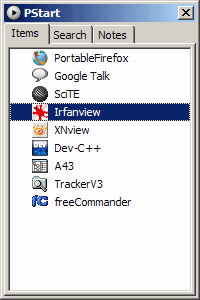
Okay, wait the minute. There are so many applications and downloaded files on my USB drive, how am I going to manage them? Well, thanks to PStart, everything is merely a snap away, providing an easy interface to list installed programs, files or folders. The concept works much like the Windows Start menu, I supposed.
Due to the aggressive usage of my USB drive storage space, now it left only about 80Mb of free space. Wow. I guess I have to more careful in my experiments next time. Hmm...